My concept for this project was to make a mini skater do a rotating ollie.
I used a piece of cardboard as the basis of my project. I found this in the free cardboard pile. I found a similar mini plastic skateboard in the junk shelf. I used a duck tape roll as a stencil for a circle. I cut the circle out and poked a whole in the center of it. I inserted the motor rod into the circle cut out.I used the hot glue gun to connect the mini skateboard to the circle cut out. I drew a mini skateboard man on the cardboard and cut it out. I hot glued the man onto the skateboard as seen above. I used wooden clumps to mount the motor and keep it in place. When the battery is connected to the motor, the circular platform spins, causing the mini man and his skateboard to rotate. Glam Shot of the add on!
This is a video of it in action
Conclusion:
I really liked how my project turned out. The motion aspect of the project really brought it to life and makes me excited to further explore this technique with other ideas. With the time constraint and hecticness of the shop during this time, I think that the temporary solution for mounting and material access could be worked on. If I had to do this again with more time, then I might have laser cut acrylic to get a cleaner edge. Although, I think the cardboard feel adds a nice aesthetic. The messy cuts worked for the visual. I would also have made a box-like structure to secure the motor in. This would have made the product easier to carry and give it a more finished look. This was a quick in the moment project, yet it still carries a lot of personalities. It shows me that sometimes your spontaneous ideas can be some of your best.
Below are the materials I used for this week’s project. All materials were found on the junk shelf.
Post card paper Pine wood board Switches “F” Shaped cut outs Given the materials I had gathered, this was the sketch I came up with for my final product. I measured 4 inches for the width and length. I cut out 4 squares like this on the Band Saw. I cut 2 of the 4 squares in half.
By the end of this step, I had two 4×4 inch squares and four 2×4 inch rectangles. The edges of these pieces were very rigid. I used a hand sander to clean them up a bit.This was the edge after sanding it. I did this to all the pieces I cut at the Band Saw.
Nest, I used a hot glue gun to assemble the wooden pieces to form a box like structure. I did not add the four wall.
I secured the structure by applying extra hot glue on the inside edges. I added the top of the enclosure by sliding it on. I then went to apply glue onto the inside edges to secure its placement. The box was not perfectly aligned as seen from the picture so I used the hand sander to line up the edges as best I could. I worked on the four wall next. I used the post card paper to make the wall. I cut the measured post card paper in half and hot glued the flaps onto the outer edges of the enclosure. I used an index card ring to close and open the flaps for easy access to the inside of the enclosure. Next, I worked on installing the switches. I used a power drill for this.I drilled two holes on the top of the enclosure.I poked the switches through and this is what it looked like after. I added details to the switches even though they don’t do anything (yet).I used the “F” cut outs to decorate the walls of the enclosure. I connected them to the enclosure using hot glue.I put the “F” cut outs all around the enclosure. This was the final touch.
Glam Shots!
Conclusion:
I found myself not thinking twice about using the Band Saw and Power Drill, although still taking safety precautions, of course, I was able to comfortably utilize these tools. I knew the steps and did not feel intimidated by them. I think the thing I found most challenging about this week’s project was the assembly of the box itself. Even though I measured (twice), the box did not align the way I thought it would. I also noticed that I should’ve drilled the holes for the switches before putting the cover on the box. It would have made putting the switches in easier and wouldn’t have disrupted the structure of the enclosure. I will say that I’m proud of my use of the index card ring and the ‘F” shapes. I think they were used in a creative way and a nice touch to the overall product.
After playing with Melody Maker and Kandinsky, I found Melody Maker to be easier. It gave me limitations to my options. I just needed to press different spaces within the grid to activate the note’s pitch. It fulfilled my expectation, therefore it was very straight forward and fluid. Kandinsky did not fulfill my expectations and was harder to use. There were so many options for me to explore. There was no consistency. I could draw similar shapes, but their sounds could be completely different. For that same reason, I would say Kandinsky is way more expressive. It gave me the freedom to connect visuals to sound. I could draw a cohesive picture and it would create a melody out of it for me. I think this freedom allowed me to accurately depict a true of my feelings better. Melody Maker was mainly altering the tempo and pitch of notes while Kandinsky was the pitch and timbre of the notes. I could not speed up the melody in Kandinsky and the timbre in Melody Maker was the same for each note.
For this week’s project, I was inspired by my J Dilla class. J Dilla is a legendary producer and MC in the Hip-hop community. He produced for A Tribe Called Quest, The Pharcyde, Common, Erykah Badu, DeAngelo, and so many more. He is known for his unique style, often referred to as Dilla Time. This style combines straight time and swing time, which creates conflict between each instrument. J Dilla’s drums were always off (on purpose) and this made his beats have more of a human feel even though he used an MPC drum machine. His dedication and talent changed the way hip-hop sounded and he is known as the best producer by the greats, such as Pete Rock.
This week I got the opportunity to meet Herman Hayes, J Dilla’s uncle, and hear about first-hand experiences relating to Dilla. Herman Hayes opened a donut shop in Detriot to honor his nephew and in reference to the last album he made before he passed called Donuts. It was super dope to hear about this black-owned business and learn more about Dilla and his life in Detriot.
This experience stayed in my mind since it happened. So, I decided to make a J Dilla donut.
I did not make a hand-drawn sketch because I thought it would be straight forward in terms of construction and shapes so I just jumped into making it on Illustrator.
These are the 4 inch diameter cut outs.These are the 3.85inch and 3.75 inch diameter cut outs and etching.I wanted the donuts to be 4 inches in diameter at the center. I wanted the diameter to slightly decrease at the top of the donut to create a more realistic siloutte. I found some cardboard in the free cardboard section of the shop. I thought this would be perfect to make donuts. The first piece of cardboard to enter the laser cutter. This was my first attempt at the laser cutter. It did not cut out even after I adjusted the settings 4 times. It finally worked! Only for the one on the corner though. This is the first piece that cut out. I repeated this process multiple times to gather my shapes. These are the cut out shapes from the laser cut. I had 9 pieces. To connect these shapes, I used hot glue and then I used my hands to apply pressure. I tried to apply hot glue evenly around the shape. This is how the circles looked after I stacked them and added the glue. This is a Birdseye view of the hot glue gunned circular stacked shapes. I used a marker to darken the etching. The marker made the etching more eligible. I used acrylic paint to give the donut more character. This is the donut after I painted it. I used a red and white mix for the base and solid blue and yellow ticks for the sprinkles. I added white highlights to the edges to make the donut pop more. I also let the paint fall off the edges to give it a more realistic feel.
Glam Shots!
Rest Easy Dilla!
In conclusion, I think this was my favorite project so far. Although a simple design, it meant something more to me than the other projects thus far. I also got to utilize the laser cutter for the very first time. Honestly, I did not fall in love with the laser cutter. It actually freaks me out and more so frustrates me. I would have to say actually using the laser cutter was the biggest challenge this week. First of all, I’m completely stressed out with using it because I so scared it’s going to catch on fire. Little flames are expected when the laser is cutting, but that really had me nervous. I had my finger hovering over the stop button. Also, adjusting the preferences was a hit or miss. This took me the longest and would still be iffy once I thought I had it down. Even though it stressed me out, I’m glad I got to have hands-on experience with it. I feel like the next time I use it, if I ever do, I will be way more confident.
I plan on giving this donut to my professor that teaches the J Dilla class. He is such a big fan of Dilla and even worked with him. I think he would greatly appreciate this.
I wanted to make 5 of these wooden faces.I found this piece of wood in the junkyard bin. It had holes in it, but I thought I could use them in my design. I used the Band Saw to cut the pieces of wood into 8 rectangles. These are the pieces after the cuts. They did not all come out the same, but I picked the 5 most similar shaped ones out of the 8 to work with. I used a clamp to stack the pieces so that when I sand them they all get the same shape.These were the pieces after I sanded them down on the Sanding Machine.These are all 5 pieces lined up together to show how similar they came out to be.Next I clamped them to a space piece of wood and drilled holes for eyes. I used this drill bit to drill the eyes.These are the pieces after I drilled the eye holes into them. I used the existing holes in the wood to guide me in this process. I used this bit to make the mouth.I repeated a process similar to the drilling of the eyes by clamping the pieces to the space wood and using the drill to cut out the mouth. It is time to paint! I used Brown, yellow, red, white and black paint. I started with the eyes and did one layer of white. I then painted one layer of brown all over the face.
Here, I painted red veins in the eyes, the black pupils, the black mouth, and white pebble teeth.
I more layers of browns, reds, and yellows on the face and used black to make bolder lines. I repeated the same painting process for all 5 faces. This was how they all came out.
Glam Shot!
Glam Shot!
Conclusion:
I really enjoyed making these little faces. I think I realized that sanding wood is my favorite thing to do. I like the multi-step process of this assignment because it showed how tools can be used together to create an original piece. One challenge I came across is that I wanted the mouth to have a deeper depth, but the drill wasn’t going further down and I wasn’t sure why. The same thing with the eyes. Anyways, I don’t think it made that much of a difference. Overall, these faces came out exactly how I imagined them to.
I struggled with this assignment. I definitely need to go to office hours. I looked through the videos and need to catch up on a lot of things. I was able to make the drum kit somewhat interactive by allowing the user to start the rhythm when they press the squares
One thing that stood out to me in this week’s reading was that loudness, one of the elements of music, is a psychological phenomenon just like pitch. It all exists in our head. That really blew my mind. Loudness is something that I’ve always notice but never thought about. It was really interesting to learn about how our bodies compress sounds to protect our ears from damage. Also, the fact that our perceptions of loudness alter when the sounds in the world get louder. It’s like our bodies are just a big pink adjusting machine. This makes me wonder just how different people perceived sounds and loudness back in the day. When the reading talked about how some people like really loud music, I found that very relatable. Although, after reading about how loud sounds can damage the ear, it made me think of how sounds can be used as a weapon. It’s scary to think that a very loud noise can be used to disrupt everyday life.
I got all my main materials from the Junk Yard on the ITP/IMA floor. Other materials include wires, paper, aluminum foil and copper tape.
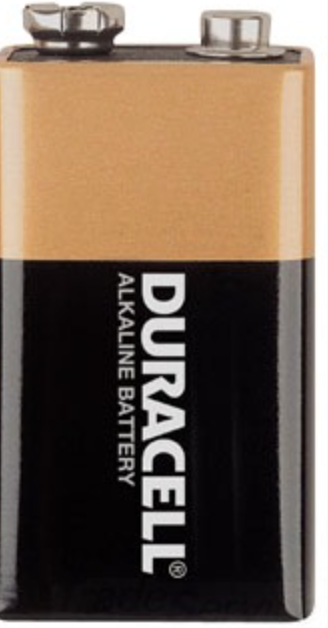
These are Rubber Tube Stoppers This is a fake plant. I used this for decor. I purchased this 9v battery at Staples. This is the only battery they had.
Mid Process
I started off with poking holes into the rubber stoppers.I used this tool to poke holes into the Rubber Stoppers.Once I made the hole, I slid a wire into it.This is the rubber stopper after I poked two holes and put the wires in.I repeated the previous steps with the rest of the stoppers and stacked them on top of each other.Next, I worked on the bottom of the flashlight. I balled up a piece of paper to hold the battery in place. On the top of the last stopper, I attached aluminum foil and copper tape to the exposed wire so that their contact with the battery would be more stable.I then attached copper tape to the battery ends to further ensure a stable connection to circuit. I attached the bottom to the rest of the stacked tubes which connected the battery ends and the exposed bottom wire.I moved on to the LEDs and soddered them together for stability. I attached LEDs to the exposed top wires and added aluminum foil to the ends to make an easier connection for the switch. When the wire and aluminum foil connect, the circuit is complete and the LEDs light up to make a flashlight that works!
I picked Type Drummer by Kyle Stetz and Rhythm Toy by Chrome Music Lab as the two rhythm projects to focus on. Type Drummer was effective as a simple interaction. It used a very globally accessible tool such as the keyboard and made making music almost too easy. The user did not have to think too hard about what sounds or tempos they wanted, they just could type anything and a unique composition was made. The only thing that was cumbersome to me was that I did not have any control over the tempo that my pattern of sounds were going at. I think that made the experience predictable and the tone of the patterns flat. Although, the interface did allow me to control the pattern of sounds. The letter ‘a’ corresponded to a specific sound and I could use that sound over and over again to create a pattern within my composition.
Rhythm Toy was effective for a visual representation of the different simple rhythms that played at the same time. You can see how the sounds were distributed in regards to the tempo. It was clear to me which sounds would be played when. I think it would serve as a great educational tool. It was hard to make a bad sounding rhythm because all of the sounds complimented each other, but the only thing I’d say that was missing was the variation of the volume of each sound. I think that would have made more possibilities and given the composition more character. With no variation to the dynamics of the sounds, the compositions sounded dull. The interface did give control over the groupings of notes. You could place the beats at specific times and this could change the whole feel of the composition. Overall, I enjoyed playing Rhythm Toy more because I felt more in control of what I was creating.




 Tori's Blog